Malaysia Scrapbook online store. We stock most of the scrapbooking supplies, rubber-stamping, Altered Art, Fine Arts paints, Artist papers & canvases. Canson, Lefranc & Bourgeois, American Craft, Americana Acrylics, Liquitex Artist Paints & Mediums, Prima Marketing, Bo Bunny, Graphic 45, Penny Black Inc, Hero Arts, Ranger, Tim Holtz, Dylusions, Sizzix, Cuttlebug, Project life by Becky Higgins, Webster Pages, Echo Park, Distress Series,Fiskars, Teresa Collins, Scor-Pal
Step by step on how to use the function Print-2-Cut function.
Things needed:
Image file download from internet.
Sizzix Eclips2 Machine.
Ecal software came with Sizzix Eclips2.
Any regular printer at home.
Media such as cardstock, Printables, Image Transfers, Grunge board, Shrink Plastic,Vinyl,Magnet Sheets, Chipboard and much more..
Load Ecal Software
Import any image(eg.bird.jpg) from internet
Trace image
Resize to any side on the cutting mat
Add Layer
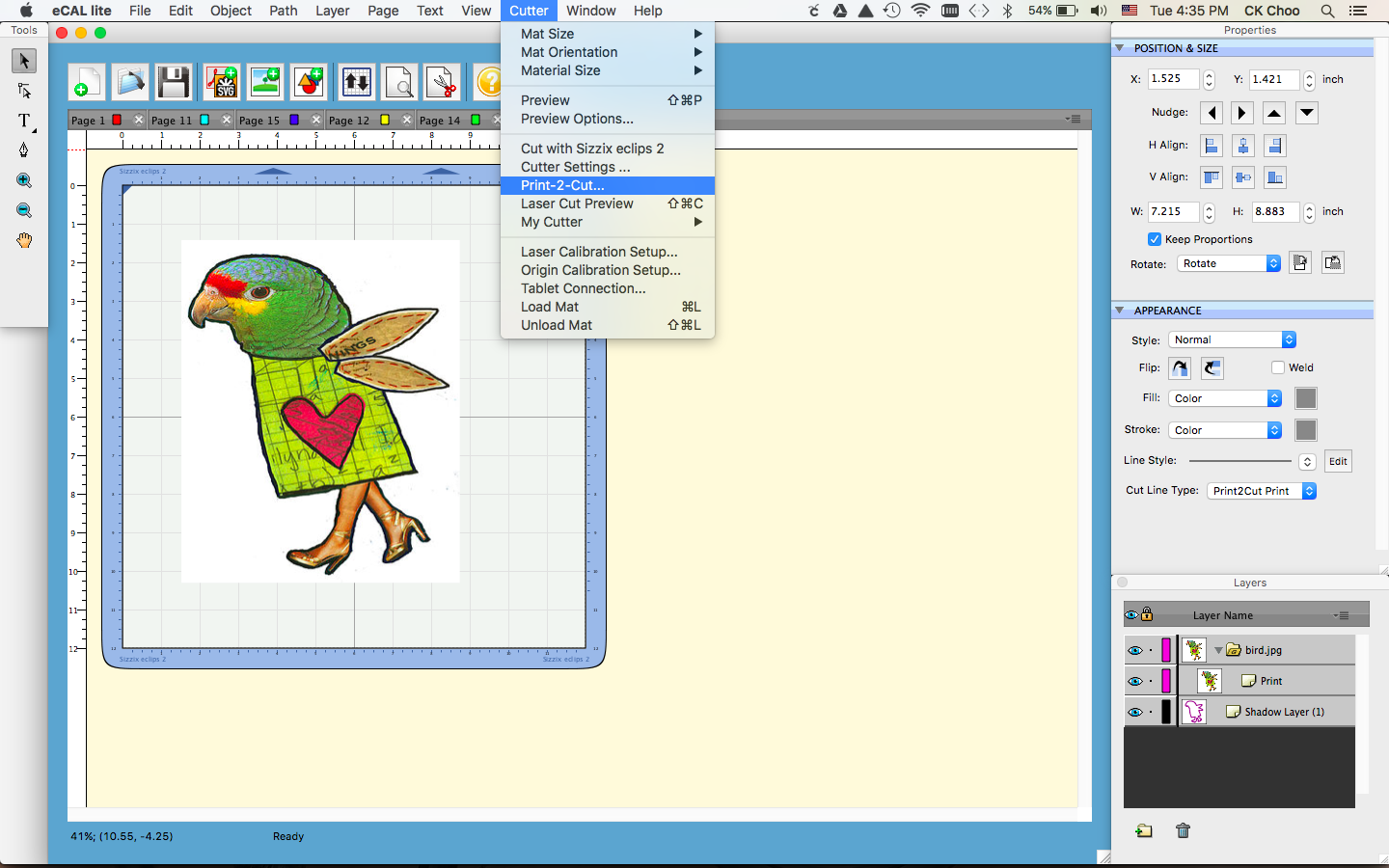
Shadow layer already added to Layers then trash Cut under bird.jpg as highlighted above.
Proceed to Print 2 Cut Function. Press Print the image will print on your regular printer.
Press Next will proceed to Eclips Controller then set the laser to the registrations marks printed with your printer. After setting the laser on 3 registration marks press Cut. Eclips2 will proceed with cutting.
Use the laser on the machine to position on the registration mark press Next.
Example the 3 registration marks
Done Cutting with an added shadow on the edge of the print
Provo Craft-Cricut Explore Air Machine. Cut through a variety of
materials from paper and iron-ons, to adhesive vinyl- even thick
materials like felt, burlap and lightweight leather. The Smart Set dial
adjusts to the material setting easily. This machine features built-in
Bluetooth for wireless cutting, writing and cutting features, or cutting
and scoring in one step. Upload your own images (.svg, .jpg, .png,
.bmp, .gif, .dxf) use Cricut Design Space online software and iPad app.
Works with Cricut cartridges. Prints printable images. This
10-1/4x25-3/4x10-1/2 inch package contains one Cricut Explore Air
Machine, one Cricut Design Space software & iPad app (iPad not
included), one storage bag, one USB cord and power cord, one German
carbide premium blade, over 100 free images, over fifty free project
ideas, one 12x12 inch StandardGrip Cricut cutting mat, one accessory
adapter, one getting started guide and pen & cardstock sample. #093573198823
Multicraft Tools will help you with just the right tool for the task at hand. Paper trimmer
12"- An essential scrapbook tool this cutter comes with flip ruler with
metric and imperial measurements as will as a rolling blade cutter.
Will hold up to 12" papers. Great for card making, scrapbooking, photos
and other DIY craft projects. Blade for use with all card and paper
types.